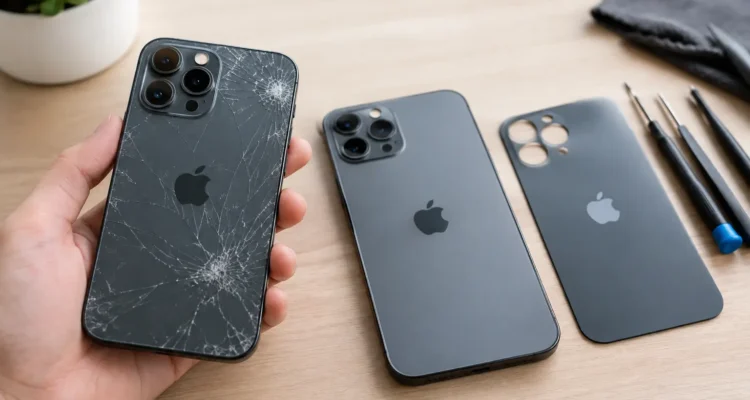
You set your iPhone down, pick it back up, and notice the damage spreading across the rear panel. It may still turn on, charge, and take calls, but a cracked back is more than a cosmetic problem. iPhone back glass replacement can help protect the internal components, make the phone safer to hold, and save you from replacing a device that still has plenty of life left.
For many people, the real question is not whether the crack looks bad. It is whether a repair is worth the money, how long it will take, and whether the phone will work normally afterward. The answer depends on your iPhone model, the extent of the damage, and whether the frame, cameras, battery, or charging system were affected in the same drop.
When iPhone Back Glass Replacement Makes Sense
A small hairline crack may seem easy to ignore. But back glass can continue to break away over time, especially around the camera bump, charging area, and corners. Sharp edges can catch your fingers, pocket, or bag. More importantly, openings in the rear glass can give dust and moisture a more direct path into your phone.
Repair is usually a smart choice when the display still works properly, the cameras are clear, and the phone has no major internal issues. Replacing the back glass is often far more economical than buying a new iPhone, transferring your data, setting up accounts again, and replacing accessories that may no longer fit.
It is especially worth getting a diagnostic when the damage happened after a hard impact. A phone can look like it only has a cracked rear panel while also having a bent frame, a loose camera lens, wireless charging trouble, or a weakened battery connection. A technician can check the full device before recommending a repair, so you are not paying for a fix that misses the real problem.
What Happens During Back Glass Repair
On many newer iPhone models, the back glass is strongly bonded to the housing. It is not designed to peel off like a screen protector. Removing it safely requires controlled heat or specialized laser equipment, careful cleanup, and attention around components that sit directly beneath the glass.
The repair process starts with an inspection. The technician checks the rear panel, camera lenses, frame, buttons, charging function, wireless charging, and basic device operation. If the frame is bent or the camera area is badly damaged, a rear housing replacement may be the better solution than replacing only the glass.
For glass-only work, the broken material is removed in a controlled way, adhesive residue is cleared, and a replacement back panel is installed and aligned. The phone is then tested again. A proper repair should not be rushed just to make the outside look better. The goal is to return a phone you can use comfortably and confidently.
Some models and damage patterns call for a different method. In those cases, the technician may transfer the phone’s original internal components into a replacement housing. This can be more involved, but it may be the right option when the frame is damaged, the rear glass is severely shattered, or the camera area cannot be restored cleanly.
Glass-Only Repair vs. Rear Housing Replacement
A glass-only repair is generally best when the frame is straight and the damage is limited to the rear panel. It preserves the existing housing and can be a cost-conscious option for an otherwise healthy iPhone.
A rear housing replacement makes more sense when the impact damaged the metal edges, stripped screw points, affected the camera surround, or caused the back to separate from the frame. It may cost more and take longer because more parts need to be moved and tested. Still, it can provide a cleaner, more dependable result than trying to repair a phone with structural damage.
What Affects the Cost and Turnaround Time?
There is no one flat price for iPhone back glass replacement because the model and damage level matter. Newer phones generally have more complex assemblies, while phones with a shattered camera area or bent frame can require additional work. If the repair also involves a camera lens, battery, charging coil, or screen, the estimate should account for those issues before work begins.
Part choice matters too. Depending on the model and repair approach, you may have options that balance appearance, durability, availability, and price. A trustworthy repair shop should explain what part is being used and what result you can reasonably expect, rather than making vague promises.
Turnaround time also depends on the repair method and parts availability. Some repairs can be completed the same day, while extensive housing transfers may require more time. If your phone is your work line, school tool, banking device, and camera all in one, ask about timing upfront. A clear answer helps you plan instead of being left without your device longer than expected.
Will the Repair Affect Wireless Charging or Water Resistance?
Wireless charging can often continue to work after a quality back glass repair, but it should always be tested before the phone is returned to you. The charging coil sits beneath the back of the phone, so a hard impact can damage it even when the visible issue is only cracked glass. If your phone stopped charging wirelessly after a drop, mention it during the diagnostic.
Water resistance needs a more careful answer. iPhones are manufactured with seals, but any phone that has been dropped, opened, or repaired should not be treated as waterproof. A professional repair can restore the physical back panel and use appropriate adhesive, but no repair shop should promise factory-level water resistance after impact damage. Keep the phone away from pools, sinks, heavy rain, and steam whenever possible.
That is not a reason to avoid repair. It is simply a reason to be realistic about how you use the phone afterward. A protective case and avoiding unnecessary moisture go a long way.
What You Should Do Before Bringing It In
If the rear glass is heavily broken, avoid pressing on it or trying to remove loose pieces yourself. Covering the area temporarily with a case can help prevent further shedding, but do not use tape directly over camera lenses or charging areas. If the phone is hot, swelling, shutting down unexpectedly, or showing a lifted back panel, stop using it and have it inspected right away. Those can be signs of battery damage.
Back up your iPhone if you can. Most back glass repairs do not require data removal, but a current backup is always smart before any device service. Remove your case and bring the phone with its passcode available if testing will be needed. If you use Find My or other security settings, ask the repair team what they need from you before the work starts.
Questions to Ask Before You Approve the Repair
A good repair experience starts with a few direct questions. Ask whether the damage is limited to the glass or whether the frame needs attention. Confirm whether wireless charging, cameras, and buttons will be tested afterward. Ask about the estimated completion time, the part option being used, and the warranty on the repair.
At ProPhonez, the focus is on giving you a clear diagnostic and a practical repair path, not pushing you toward a replacement phone you may not need. Quality parts, careful testing, and warranty coverage matter because a repaired phone should feel reliable when you walk out the door.
A cracked back does not have to turn into a new-phone purchase. Get the damage checked before the cracks spread, protect your data with a backup, and choose a repair option that fits the actual condition of your iPhone and your budget.