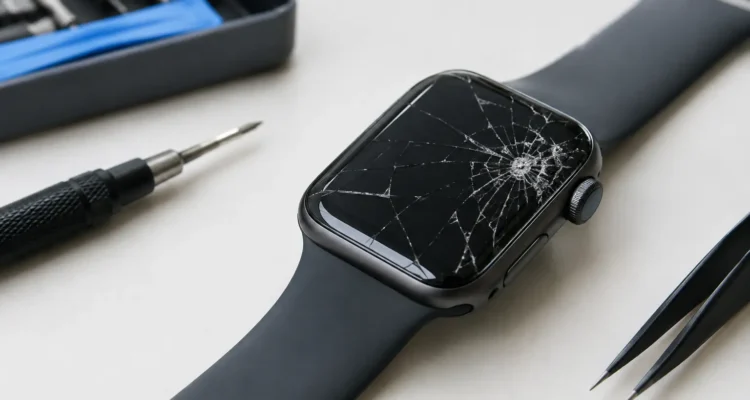
A crack across your Apple Watch can turn a quick glance at a text, workout, or meeting reminder into an annoying risk. Apple Watch cracked screen repair is about more than appearance: broken glass can snag a finger, let moisture and debris reach sensitive components, and make a small impact mark spread into a larger display problem.
If your watch still powers on, tracks activity, and responds to touch, you may have a good chance of restoring it without replacing the entire device. The best next step is to stop treating the damage as cosmetic, protect the watch from further exposure, and have the screen assessed before another bump makes the repair more complicated.
When a Cracked Apple Watch Screen Needs Attention
Not every crack affects the watch in the same way. A thin hairline crack near an edge may leave the display and touch functions working normally for now. A deep fracture, lifted glass, black spots, flickering, or a screen that no longer recognizes taps points to damage beyond the outer surface.
It is also worth paying attention to how the watch feels on your wrist. If shards are loose, the screen is separating from the case, or a sharp edge is exposed, stop wearing it until it is inspected. A damaged display is uncomfortable at best and can worsen quickly when it rubs against clothing, a desk, or gym equipment.
Water resistance is another concern. Apple Watches are built with seals, but a cracked display can compromise that protection. Do not assume your watch is still safe for swimming, showering, or even heavy rain after the screen breaks. Avoid charging it if you suspect moisture entered the device, especially if the display behaves strangely or the watch gets unusually warm.
What Apple Watch Cracked Screen Repair Usually Involves
Apple Watch screens are compact, tightly sealed, and closely connected to the touch layer and display beneath them. That means a proper repair is often more involved than replacing only the top glass. Depending on the model and the damage, a technician may need to replace the full screen assembly to restore clear visuals and reliable touch response.
This approach can be the safer choice when the OLED display has lines, dark patches, dead pixels, or touch dead zones. Replacing only visibly cracked glass may not solve hidden display damage, and it can leave the watch less dependable if the repair is not done with the right tools and adhesive.
Before work starts, a technician should inspect the watch, test the display and touch response, and check for signs of frame damage or moisture exposure. If the case is bent or the screen has lifted because of a swollen battery, the repair plan may change. Fixing the visible crack without addressing the underlying issue can lead to another failure soon after.
Screen Damage Versus Battery Swelling
A screen that is lifting away from the watch case is not always the result of a drop. In some cases, a failing battery expands and pushes the display upward. This is a repair that needs prompt attention. Do not press the screen back into place, tape it down, or continue charging the watch.
A technician can determine whether the issue is a cracked display, a battery problem, or both. Addressing the cause protects your watch and helps avoid damage to the display cables and internal components.
Should You Repair or Replace Your Apple Watch?
The answer depends on the model, its overall condition, and how you use it. Repair often makes sense when the watch is relatively current, pairs reliably with your iPhone, holds a reasonable charge, and has no other major faults. You keep your familiar settings, bands, and daily routine without spending on a full replacement.
Replacement may be worth considering if the watch has extensive case damage, serious water exposure, multiple internal issues, or an aging battery along with a damaged screen. The goal is not to push a repair that does not make financial sense. A clear diagnosis and quote let you compare the repair cost with the value of upgrading.
For many people, repairing a screen is the more cost-conscious move. Replacing a smartwatch also means time spent researching models, transferring settings, pairing again, and getting used to a new device. If the rest of your Apple Watch is working well, restoring the display can be the simplest way to get back to your routine.
What Affects Apple Watch Screen Repair Cost?
There is no one price for every Apple Watch cracked screen repair because Apple Watch generations and sizes use different parts and repair methods. The watch model matters, as do the size of the display, the availability of the replacement part, and whether you choose a genuine or high-quality aftermarket option where available.
The condition of the watch also affects the quote. A straightforward cracked screen with a working display is different from a watch with touch failure, frame damage, battery swelling, or water damage. An on-the-spot diagnostic helps separate a screen-only issue from a repair that needs additional work.
The lowest advertised price is not always the best value. Ask what part will be used, whether the display will be tested before and after service, and whether the repair includes a warranty. A quality repair should focus on reliable touch response, brightness, fit, and everyday usability – not just making the crack disappear.
What to Do Before You Bring Your Watch In
If the watch is still responsive, unpairing it or making sure your iPhone has recently backed up your Apple Watch data is a smart precaution. Your health and activity information is generally connected to your iPhone backup and iCloud settings, but it is always better to confirm your data is current before any device service.
Remove the watch band if it makes handling easier, but do not attempt to pry up the screen or remove loose glass yourself. Apple Watch repairs require careful handling because the display is sealed closely to the case and internal cables are delicate. A do-it-yourself kit can look affordable until a damaged cable, punctured battery, or lost water resistance turns a screen repair into a larger bill.
Keep the watch dry, avoid workouts that expose it to sweat, and do not use a cracked watch in a pool or shower. If the display has blacked out but the watch still vibrates or makes sounds, bring it in rather than repeatedly forcing restarts or charging it for hours.
A Faster, Clearer Repair Experience
A good local repair experience should not leave you guessing what is wrong or how long you will be without your watch. At ProPhonez, the process starts with a diagnostic to confirm the damage and discuss the available repair options. You get a clear quote before work begins, so you can decide whether repairing your Apple Watch is the right call.
Turnaround time depends on the exact model, part availability, and whether the watch has additional damage. Some screen repairs can be handled quickly, while others require more time to source the correct assembly and complete proper testing. Rushing a tightly sealed smartwatch repair can create problems, so the priority should be a repair that works reliably when you put it back on your wrist.
After service, test the basics before you leave: touch response across the whole screen, display brightness, side button and Digital Crown functions, charging, and pairing with your iPhone. A repair backed by a 30-day warranty gives you added peace of mind if an issue appears after normal use.
Keep a Small Crack From Becoming a Bigger Problem
A screen protector and a protective case can reduce the chance of another impact, although no accessory makes a watch indestructible. Be especially careful during workouts, home projects, travel, and any activity where your wrist can hit metal edges or hard surfaces. If you notice a new crack, lifted edge, flickering display, or moisture under the screen, get it checked early. A quick diagnosis can be the difference between a manageable screen repair and a watch that is no longer worth saving.