A phone dropped in a sink, caught in the rain, or knocked into a drink can go from fully functional to unreliable without warning. If you need water damaged phone repair Toronto residents can count on, the first few minutes matter – but the right next step matters even more. Powering it on repeatedly, charging it, or trying a social-media fix can turn a repairable issue into a much larger one.
Water damage is not always obvious. Your phone may appear normal at first, then develop charging problems, screen flickering, muffled audio, random restarts, or a battery that drains far too quickly. Getting the device checked early gives you the best chance of protecting both the phone and the information stored on it.
What to Do Right After Your Phone Gets Wet
Start by removing your phone from the water and turning it off. If it is already off, leave it off. Take off the case, disconnect accessories, and remove the SIM card tray if your model has one. Gently dry the outside with a soft, lint-free cloth, keeping the charging port facing downward so moisture can drain rather than move deeper into the device.
Do not plug it in to see whether it still charges. Electricity and moisture do not mix, and charging a wet phone can cause a short on the charging circuit or motherboard. Avoid pressing buttons unnecessarily as well. Each press can move moisture further inside the phone.
The old rice trick is not a repair method. Rice does not remove residue from the internal components, and small particles can end up in the charging port or speakers. Hair dryers, ovens, radiators, and direct sunlight are also risky. Excess heat can weaken adhesives, warp internal parts, damage the battery, and make a difficult repair worse.
If the device has been exposed to saltwater, pool water, coffee, soda, or another liquid besides clean water, act quickly. These liquids leave behind minerals, sugar, chlorine, or other residue that can corrode components long after the phone feels dry on the outside.
Why Water Damage Gets Worse Over Time
A phone is packed with tightly connected parts: the battery, display, charging system, cameras, microphones, speakers, antennas, and motherboard. Once liquid reaches these areas, corrosion can begin. That corrosion interrupts electrical paths and may continue spreading over days or weeks.
This is why a phone that works after a spill is not necessarily in the clear. You might be able to send messages today but find that Face ID, fingerprint recognition, the front camera, charging port, or earpiece fails later. The longer residue stays on delicate components, the more unpredictable the damage can become.
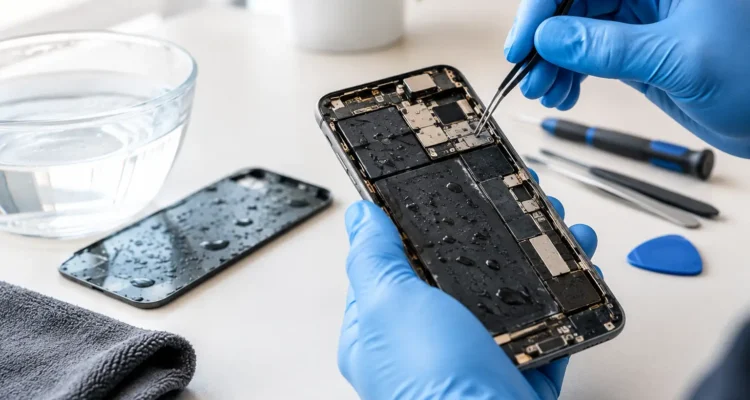
Professional water-damage service focuses on more than drying the exterior. A technician needs to inspect the device for moisture indicators, corrosion, damaged connectors, and affected components. Depending on the model and the exposure, the repair may involve internal cleaning, battery replacement, charging port repair, screen replacement, camera repair, or board-level work.
Water Damaged Phone Repair in Toronto: What to Expect
A good repair process starts with an on-the-spot diagnostic. The goal is to identify what the liquid reached and whether the device can safely power on, charge, and retain stable function. At ProPhonez, technicians assess the visible condition, test key functions where it is safe to do so, and explain the repair path before moving forward.
Not every water-damaged phone needs the same service. A quick splash that only affects the charging port may have a different outcome than a phone submerged for several minutes. The device model also matters. Newer phones often have water-resistance features, but water-resistant does not mean waterproof – and seals can weaken after drops, age, previous repairs, or everyday wear.
After inspection and cleaning, the phone should be tested carefully. That includes the display, touch response, cameras, speakers, microphones, buttons, cellular service, Wi-Fi, Bluetooth, charging, and battery behavior. A proper test helps catch problems that may not show up the moment the device turns back on.
Turnaround time depends on the damage. Some issues can be handled quickly, while phones with motherboard corrosion or multiple affected components may require more time. The honest answer is that it depends on what the diagnostic reveals. A technician should never promise a complete recovery before checking the device inside.
Your Data May Be the Most Valuable Part
For many people, the phone itself is replaceable. The photos, messages, work files, school notes, banking access, saved passwords, and contacts are not. That is why bringing in a water-damaged phone sooner can make a major difference.
If the device still turns on, avoid spending time scrolling through it or transferring files while it may be unstable. Let a technician assess it first. In some cases, data recovery or a backup can be prioritized once the device is safe enough to operate. If the phone will not power on, board-level repair may still be an option depending on the condition of the internal components.
There are limits, of course. Severe corrosion, a damaged storage chip, or a compromised motherboard can affect whether data can be recovered. Still, early professional attention gives you a better chance than leaving the phone in a drawer for a week and hoping it comes back to life.
Signs You Should Bring It In Immediately
Any exposure to liquid is worth taking seriously, but certain symptoms call for quick action. Bring your phone in as soon as possible if it will not power on, gets unusually warm, shows lines or dark spots on the screen, will not charge, has distorted sound, loses cellular signal, restarts on its own, or displays a liquid-detection alert.
A swollen battery is another urgent warning sign. If the screen begins lifting away from the frame or the phone feels unusually hot, stop using it. Do not charge or keep it in a pocket. Battery damage should be inspected professionally for safety.
Even a phone that seems fine may benefit from a diagnostic after full submersion or exposure to dirty liquid. It is often more affordable to address moisture and corrosion early than to wait for several parts to fail later.
Repair or Replace? Make the Call With Real Information
Replacement is not always the best answer. A newer phone with a healthy screen, strong battery life, and important data may be well worth repairing. Repair can also save you the cost and hassle of buying a new device, transferring accounts, restoring apps, and setting everything up again.
On the other hand, replacement can make sense when corrosion is extensive, multiple major components have failed, or the repair cost approaches the value of the device. Your technician should give you a clear explanation of the condition, expected repair work, and available part options so you can decide with confidence.
For phones that can be repaired, you may have a choice between genuine and high-quality aftermarket parts for components such as screens or batteries. The best option depends on your budget, your model, and how you use the device. A transparent quote is more useful than a one-size-fits-all answer.
Protect Your Next Phone From Water Trouble
No case can make every accident harmless, but a quality case with raised edges can help reduce impact damage when a wet phone is dropped. Keep your phone away from sink edges, pool ledges, and open drinks when possible. If you work outdoors or commute in rough weather, a waterproof pouch can be a practical extra layer of protection.
Back up your data regularly, preferably before anything goes wrong. Automatic cloud backups and occasional computer backups make a stressful repair situation easier. They do not prevent water damage, but they can prevent a spill from becoming a permanent loss of photos or important files.
A wet phone is frustrating, especially when you rely on it for work, school, family, and everything in between. Turn it off, skip the rice, and get it checked before hidden corrosion has time to take hold. A fast diagnostic can be the difference between getting back to normal and losing the device you depend on every day.