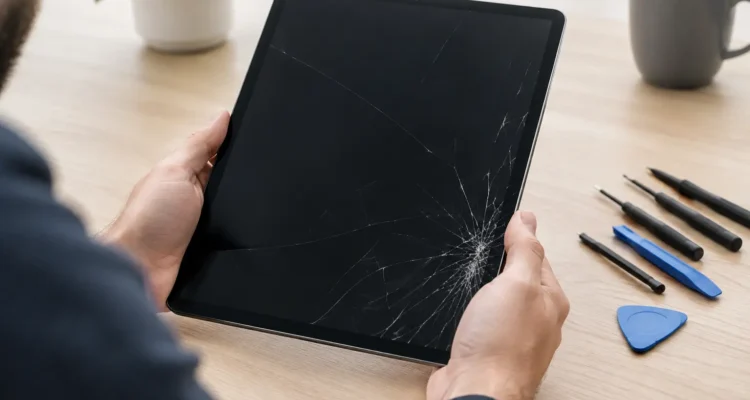
A hairline crack can turn into a sharp edge, missed taps, and a screen that becomes harder to read every day. If you need iPad screen repair, acting sooner can help protect the display underneath and get your tablet back to work, school, streaming, and family life without the cost and hassle of replacing it.
A damaged iPad does not always need to be written off. Whether it slipped out of a backpack, met a tile floor, or took a hit at the corner of the screen, a technician can identify what is actually damaged and recommend the repair that makes sense for your model and budget.
When Does an iPad Screen Need Repair?
Not every cracked screen fails the same way. On some iPads, the outer glass is cracked but the picture and touch response still work. On others, the impact damages the LCD or display assembly underneath. You may see black spots, vertical lines, flickering, discoloration, a blank display, or areas where taps and swipes no longer register.
Even a small crack deserves attention if it is spreading, catching on your finger, or exposing the screen to moisture and dust. The glass helps protect the components below it. Once that layer is compromised, a minor drop can become a more involved repair.
A quick in-person diagnostic is the best way to separate glass damage from a deeper display issue. It also gives you a clear answer before you spend money on parts you may not need.
Signs the Display Is Damaged Too
A broken screen is usually more than a cosmetic problem when the iPad shows a black screen while still powering on, flashes or flickers, has colored lines, displays ink-like blotches, or ignores touch in certain areas. Ghost touches are another common sign. That is when the tablet opens apps, types, or scrolls on its own because the damaged digitizer is sending false signals.
If the iPad has no visible cracks but the screen is dark, unresponsive, or distorted after a drop, the display connection or internal screen components may still be affected. A proper inspection matters because the right solution depends on the device and the damage, not just what the glass looks like.
Why Delaying iPad Screen Repair Can Cost More
It is tempting to keep using a cracked iPad with a screen protector over it. That may be a short-term option for a very light crack, but it does not restore the damaged glass or protect the internal display from future impact. Pressure from typing, drawing, or carrying the tablet can make the crack travel across the screen.
There is also a safety and usability issue. Cracked edges can shed tiny glass fragments, while dead spots and inaccurate touch make it harder to reply to messages, join meetings, fill out forms, or help a child with schoolwork. If you use an Apple Pencil for notes or creative work, damaged glass can make writing feel inconsistent and less precise.
Water is another concern. iPads are not designed to be opened or exposed to liquids, and a cracked screen creates another path for moisture to reach sensitive components. If your iPad was dropped in water or got wet through a broken screen, turn it off if possible and have it checked quickly. Do not charge it, use heat to dry it, or assume it is fine because it turns on.
What Happens During a Professional Screen Repair
A reliable repair starts with more than removing broken glass. The technician confirms the iPad model, checks the screen image and touch function, examines the frame for bends, and looks for signs of additional impact or liquid damage. This helps avoid installing a new screen on a tablet with another issue hiding underneath.
The damaged display assembly is carefully removed, and the inside of the device is inspected before the replacement is fitted. After installation, the screen should be tested for brightness, color, touch response, cameras, speakers, charging, and general operation. On models with a home button or biometric features, careful handling is especially important because some original components must remain with the device for certain functions to continue working.
At ProPhonez, the goal is to make the process simple: bring in the iPad for a diagnosis, approve a clear repair option, and pick it up after testing. Many screen repairs can be completed the same day, often within 30 minutes to two hours depending on the model, part availability, and the extent of the damage. A bent frame, water exposure, or damage beyond the screen can add time, but you should know that before work moves forward.
Choosing the Right Replacement Screen
The cheapest screen is not automatically the best value. Screen quality can affect brightness, color, touch sensitivity, and long-term durability. Some customers prefer genuine parts when available, while others choose a high-quality aftermarket part to keep costs lower. Both options can make sense, depending on your iPad model, how you use it, and your budget.
Ask what part is being installed and what warranty applies to the repair. A 30-day warranty gives you time to confirm that the replacement screen is performing as it should under normal use. It generally does not cover a new drop, liquid damage, or a separate issue that was not part of the original repair, so treat your repaired iPad with the same care you would give a new one.
Be cautious with do-it-yourself screen kits. They can look affordable until a fragile display breaks during installation, a cable is damaged, or the tablet fails to seal correctly afterward. DIY repair may suit someone with the right tools and experience, but most people are better served by a professional repair that includes diagnostics, proper installation, and testing.
Protect Your Data Before a Screen Repair
Screen replacement normally focuses on the display and should not erase your iPad. Still, backing up your device is a smart habit before any repair. If the screen is usable, save your photos, files, messages, and app data to your preferred backup service or a computer before bringing it in.
If the display is too damaged to use, let the technician know whether there are files you need. In some cases, a temporary screen connection or a separate diagnostic may help you access the device. Data recovery is not guaranteed, especially after severe impact or liquid damage, but explaining what matters to you early gives the repair team the best chance to help.
You should also know your passcode. A repair technician does not need your personal information to replace glass, but the device may need to be unlocked after the repair for final testing. Never share account passwords unnecessarily, and remove the iPad from any case or cover if you can.
Simple Ways to Prevent the Next Crack
A good case with raised edges and a quality screen protector can reduce the damage from everyday drops. No accessory makes an iPad indestructible, but the right setup gives the screen more protection when life gets busy.
Avoid leaving the tablet on the edge of a bed, couch, car roof, or kitchen counter. For families, a case with a secure grip is often worth more than an ultra-thin design. For students and commuters, keep the iPad in a padded sleeve rather than loose in a bag with keys, chargers, or heavy books.
If the frame is bent after a drop, do not force a case onto it or press the screen back into place. Pressure can worsen display damage. Bring it in for an assessment instead.
Get Back to Using Your iPad Without the Frustration
A cracked iPad should not force you into buying a replacement before you are ready. The right repair can restore a clear display, reliable touch response, and the confidence to use your tablet normally again. Get a diagnosis while the damage is still manageable, ask about the part options and turnaround time for your model, and give your iPad the practical fix it needs to stay part of your day.