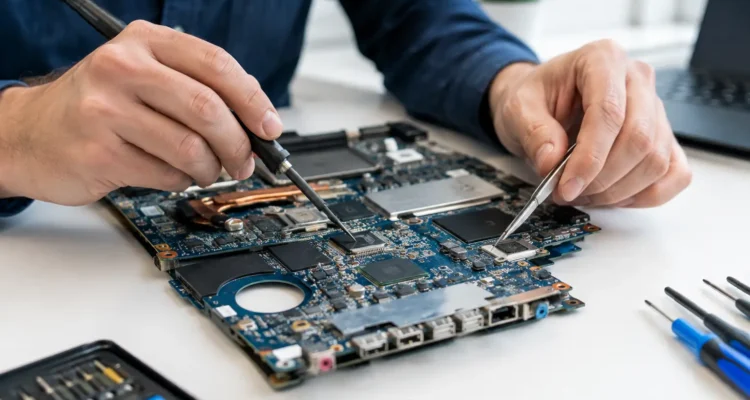
A dead phone is not always a dead phone. When your device will not charge, keeps restarting, loses touch response, or stops connecting to Wi-Fi after a drop or spill, the problem may be deeper than the screen or battery. Motherboard repair can restore the tiny components and connections that keep your phone, tablet, laptop, or desktop working – often without the cost, setup hassle, and potential data loss of replacing it.
This is not a repair to guess at. The motherboard is the central circuit board inside your device, and one damaged chip, connector, line, or solder joint can cause symptoms that look like a dozen different problems. A proper diagnosis is what separates a repairable issue from an expensive wrong part.
What a Motherboard Does in Your Device
Your motherboard connects the parts you use every day: the processor, charging port, battery, display, cameras, speakers, storage, Wi-Fi, and more. In a phone, it is a compact, layered board packed with microscopic components. In a laptop or desktop, it is larger, but it still manages the system’s power, communication, and essential functions.
That is why motherboard trouble can be confusing. A device that will not power on may have a failed charging circuit rather than a bad battery. A phone that shows a black screen may still be running in the background. A laptop that will not recognize its keyboard, trackpad, or USB accessories may have a board-level issue instead of several separate parts failing at once.
The good news is that board damage does not automatically mean replacement is your only option. It depends on where the fault is, how severe the damage is, the age and value of the device, and whether the board can be repaired safely.
Signs You May Need Motherboard Repair
Some device problems are straightforward. A cracked display, worn battery, or damaged charging port can often be identified quickly. Board-level faults tend to show up as inconsistent, unusual, or multiple symptoms at the same time.
You may need a closer diagnostic if your device will not turn on even after trying a known-good charger, powers on only occasionally, becomes unusually hot, or gets stuck in a restart loop. Other warning signs include no touch response on a working screen, missing cellular signal, failed Wi-Fi or Bluetooth, distorted audio, camera errors, and charging that starts and stops without a clear reason.
Water exposure is one of the biggest reasons to check the motherboard. Even if a phone or laptop works immediately after getting wet, moisture can begin corroding connectors and components underneath shields or around power lines. The damage may appear days or weeks later as charging trouble, random shutdowns, or a device that suddenly will not start.
A hard drop can cause trouble too. The exterior may look fine while a tiny connection inside has cracked loose. This is especially common when a device works until it is moved, pressed, or plugged in.
Why a Diagnostic Matters Before Any Repair
Replacing parts without finding the real fault can waste time and money. For example, installing a new battery will not fix a charging IC issue. Replacing the screen will not solve a device that is powered on but cannot send an image because of damage on the board. A rushed repair can also risk your stored photos, messages, notes, and work files.
A technician starts by checking the basics: power draw, charging behavior, visible liquid damage, connectors, and the condition of related components. From there, board-level testing can narrow down whether the issue is with a power circuit, charging circuit, display line, data line, audio circuit, or another component.
This approach matters because the symptoms can overlap. If your phone will not charge, the cause could be debris in the port, a broken cable, a worn battery, a damaged charging port, or a motherboard fault. The right repair is based on evidence, not assumptions.
What Happens During a Board-Level Repair
Motherboard work is a specialized repair. It may involve careful cleaning after liquid exposure, repairing damaged pads or traces, replacing small components, restoring connectors, or reworking soldered chips. The exact process varies widely by device and fault.
For liquid-damaged devices, speed matters. Turn the device off, disconnect it from power, and avoid repeatedly trying to charge or restart it. Heat and electrical current can make corrosion-related damage worse. Do not rely on rice either. It does not remove contamination from inside the device, and it can delay proper treatment.
During repair, the device may need to be disassembled so the board can be inspected and tested. Technicians use specialized tools to work on components that are far too small for a standard parts swap. Once the repair is complete, the device should be tested for the functions related to the original problem, such as charging, power, display, touch, calling, cameras, audio, or connectivity.
Not every motherboard can or should be repaired. Severe corrosion, damage to critical layers of the board, or an unavailable replacement chip may make repair impractical. A trustworthy shop should explain the finding clearly and give you realistic options instead of promising a fix before diagnosis.
Is Repair Better Than Replacing the Device?
For many people, the answer comes down to cost and data. A newer phone, MacBook, laptop, or tablet can be expensive to replace, and transferring everything to a new device takes time. If a board-level repair brings a reliable device back at a reasonable price, it can be the more economical choice.
Repair can be especially worthwhile when your device holds important files that are not backed up. In many phones and laptops, the storage is tied closely to the original board. Swapping the motherboard may make the device work, but it will not automatically bring back the data stored on the damaged one. When data is the priority, tell the technician before any work begins.
There are trade-offs. A much older device may not justify a complex repair if it also needs a battery, screen, or other major parts. If the board is badly damaged after water exposure, a repair may restore it but leave uncertainty about long-term reliability. Your budget, how you use the device, its condition, and the value of the data all matter.
How to Protect Your Data Before Bringing It In
If your device is still working, back it up right away. Save current photos, documents, messages, and app data to your preferred backup service or computer. If it is unstable, do not wait for it to fail completely.
Before bringing it in, write down the passcode if you are comfortable providing it for testing. A passcode is sometimes needed to verify cameras, touch functions, speakers, and other features after repair. You can also ask what testing requires and whether a repair can be completed with limited access. Never share account passwords unless there is a specific, explained reason to do so.
For a water-damaged device that still turns on, resist the urge to keep using it until it dies. Power it down and get it assessed. The earlier corrosion is addressed, the better the chance of saving both the device and its data.
Questions to Ask Before Approving a Repair
You deserve a clear answer before spending money on a complex repair. Ask whether the shop has confirmed a board-level fault or is still diagnosing the device. Find out what functions will be tested after repair, whether the quote changes if additional damage is found, and what warranty applies to the completed work.
Also ask whether there is a diagnostic or no-fix fee. Board-level work can take longer than a standard screen replacement because the fault must be located precisely. A same-day result is possible for some issues, but water damage and complicated intermittent faults may require more time. A realistic timeline is better than a quick promise that leaves you without answers.
At ProPhonez, the goal is to give you a practical path forward: diagnose the problem, explain the options, and repair what makes sense for your device and budget. Whether it is your work laptop, your child’s tablet, or the phone you depend on all day, do not let a power or charging problem force a replacement before you know what can be saved.