A cracked phone screen before work, a MacBook that will not hold a charge, or a tablet stuck on a loading screen can disrupt far more than your day. The right to repair is about having a practical choice when that happens: repair the device you own with a qualified local technician instead of feeling pushed into an expensive replacement.
For most people, this is not a debate about electronics policy. It is about getting back to calls, schoolwork, banking apps, family photos, work files, and the devices you depend on every day. A repairable device can save money, reduce waste, and keep your digital life where it belongs – with you.
What Is the Right to Repair?
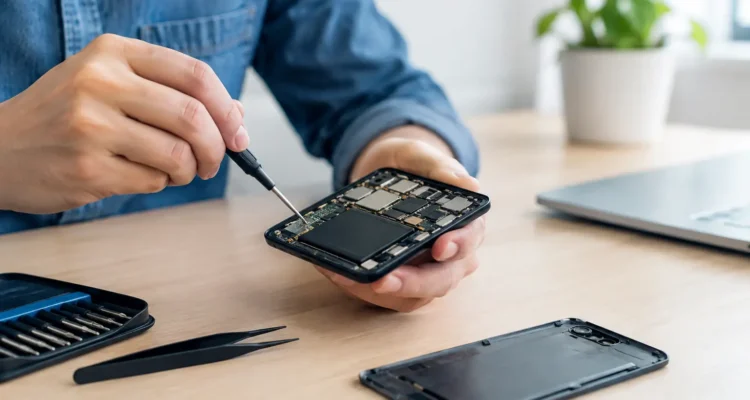
Right to repair is the idea that device owners and independent repair professionals should be able to access the parts, tools, diagnostic information, and repair options needed to fix common problems. That can include replacing a battery, repairing a charging port, installing a new screen, resolving software issues, or addressing component-level damage.
For years, many repairs were difficult because manufacturers controlled access to genuine parts, repair manuals, diagnostic software, or calibration tools. Some devices also use software pairing that can affect certain functions after a part is replaced. These restrictions do not always make repair impossible, but they can make it more expensive, slower, or limited to a narrow set of service options.
The right to repair does not mean every repair should be attempted at home. A swollen battery, water-damaged motherboard, or device with sensitive personal data needs careful handling. It means you should have meaningful options: an authorized provider, a capable independent repair shop, or a do-it-yourself repair when the job and your experience make sense.
Why Repair Choice Matters When Your Device Fails
Replacing a phone or laptop may look like the fastest solution, but it often creates a second list of problems. You have to transfer accounts, restore backups, download apps again, move photos, replace accessories, and learn a new device. If your old device will not turn on, data transfer can become even harder.
Repair can be the more practical path when the rest of the device is still in good shape. A battery replacement can give an older phone a useful second life. A screen repair can restore a device that is otherwise working perfectly. Water-damage treatment may prevent corrosion from turning a small spill into a complete failure, especially when the device is brought in quickly.
Cost matters too. A new flagship phone, tablet, or laptop can be a major purchase. Repair lets you address the actual problem rather than paying for a whole new device when only one part has failed. The best choice depends on the device’s age, condition, repair cost, and what you need it to do, but replacement should not be the only answer by default.
It Keeps Your Options Open
A healthy repair market gives you more than one place to take a broken device. You can compare turnaround times, part choices, warranty coverage, and diagnostic recommendations. That matters when you need a same-day screen repair, but it also matters for complex issues that require testing before anyone can quote a realistic solution.
Independent repair shops can often help with a wide range of devices in one visit: iPhones, Samsung and Android phones, iPads and tablets, smartwatches, MacBooks, Windows laptops, and desktop computers. For a household with several devices, that convenience is a real benefit.
It Can Protect Your Data
Your phone is not just a phone. It may hold years of messages, authentication apps, contacts, photos, notes, and work documents. A repair that preserves the original device can be less disruptive than starting over with a replacement.
That said, no honest technician can promise data recovery in every situation. Severe liquid damage, failed storage chips, or motherboard damage can limit what is possible. If a device still powers on, back it up as soon as you can. If it does not, avoid repeated charging attempts after water exposure and ask about diagnostic and data-recovery options before authorizing a replacement.
What Right to Repair Does Not Mean
The phrase can make repair sound simple in every case, but electronics are not all built the same. Modern devices are thin, tightly packed, glued together, and often designed with security features that protect users from stolen-device access. Those features serve a purpose, even when they make repair more involved.
Right to repair also does not mean every part on the market is equal. A low-cost screen may restore a display but differ from an original-quality part in brightness, color accuracy, touch response, or durability. A battery that does not meet quality standards can create performance and safety concerns. The right repair is not automatically the cheapest repair.
A good repair conversation should be clear about the trade-offs. Ask whether genuine or high-quality aftermarket parts are available, how each option affects price and performance, whether a repair requires calibration, and what warranty comes with the work. Clear answers help you decide with confidence.
Common Repairs That Make Sense
Many everyday device failures are repairable, particularly when they are caught early. Screen damage is the obvious example, but it is far from the only one. Batteries wear out over time, charging ports collect debris or suffer damage, speakers and microphones can fail, and software glitches can make a good device feel unusable.
The repairs that often make financial sense include:
- Cracked LCDs, broken glass, display lines, flickering screens, and touch issues
- Batteries that drain quickly, shut down unexpectedly, or swell
- Charging ports, earpieces, speakers, microphones, cameras, and buttons
- Back housing damage, water exposure, motherboard faults, and boot problems
- Laptop keyboard, screen, battery, charging, storage, and software issues
The condition behind the problem matters. For example, a phone that will not charge may need only a professional port cleaning, while another may have board-level charging damage. A device that looks fine after a spill may still have corrosion developing inside. On-the-spot diagnostics help separate a straightforward repair from a problem that needs deeper work.
How to Make a Smart Repair Decision
Start by describing what happened and when the issue began. Did the phone fall? Did it get wet? Did the battery start failing gradually? Does the laptop work only while plugged in? Details that seem minor can point a technician toward the actual cause.
Before you hand over a device, back up your data if possible and remove any case or accessory that could hide damage. Know your passcode if testing will require it, but only provide access through a process you are comfortable with. For account-locked devices, ownership verification may be required. Security protections are there for a reason, and a legitimate repair provider should respect them.
Then ask about the repair plan. You should understand the estimated cost, expected turnaround time, available part options, warranty terms, and whether your data is likely to remain intact. For simple jobs, such as many screen repairs, service may be completed the same day. Complex water damage, motherboard work, and data recovery usually need more time because proper testing cannot be rushed.
Right to Repair and Responsible Repair Are Connected
More repair options only help when the work is done carefully. A rushed screen installation can leave gaps or affect touch performance. An untested battery replacement can create new problems. A device exposed to water needs more than a quick dry-out; internal inspection and corrosion treatment can make the difference between a temporary recovery and a lasting repair.
That is why the right to repair is also about access to skilled technicians, quality parts, proper tools, and honest diagnostics. At ProPhonez, the goal is not to sell a repair that does not make sense. It is to identify what failed, explain the available options, and help you get the most useful life from the device you already own.
If your device is damaged, do not assume replacement is your only move. Protect it from further damage, avoid unverified quick fixes, and get a diagnosis while repair is still an option. A clear answer can save your device, your data, and a lot of unnecessary expense.